Utility bills are mailed and emailed on the last business day of the month.
The City reads all meters on the same day, usually around the 19th of the month. The actual date can vary depending on weekends and holidays.
It is based on the dates on which meter readings are completed, which is usually around the 19th of the month. For example, for the October 1st bill, the usage will be calculated from August 19th – Sept 19th.
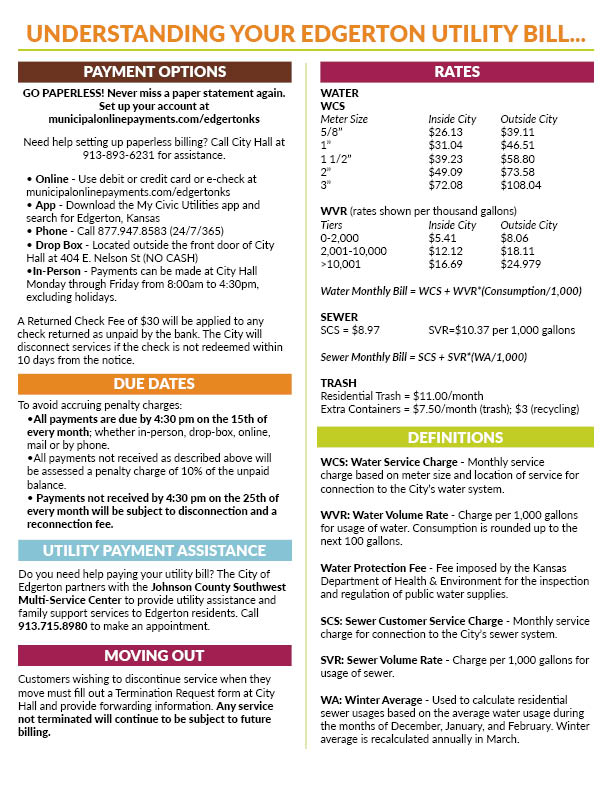
Click here for rates and other information about your bill.
You can email finance@edgertonks.org or you can call City Hall at 913-893-6231.
You can pay your bill in any of the following ways:
- Online – Register or log into your online account here. You can also use the Quick Pay option to pay without setting up an online account.
- Mobile App – Download the My Civic Utilities app and search for Edgerton, Kansas. The login is the same as your online account.
- Phone – call 1-877-947-8583 (24/7/365)
- Drop Box – Located outside the front door of City Hall at 404 E. Nelson St. (NO CASH)
- In-Person – Payments can be made at City Hall Monday – Friday from 8am to 4:30pm, excluding holidays.
The City accepts Visa, MasterCard, Discover, American Express and e-checks (online only).
No. The City doesn’t charge any fees for paying your bill online or with a debit/credit card or e-check.
Payment is due by 4:30pm on the 15th.
A 10% penalty will be applied to your account. If you don’t pay by the 25th at 4:30pm, your service will be subject to disconnection, and your account will be charged $25. Service will be restored during regular business hours upon payment of the balance in full. If you request service to be restored after hours, your account will be charged an additional $75.
You can wait until City offices are open for business or you can call 913-893-6231 and select option 0 to reach the on-call staff member and request service be restored. There is a $75 charge for service restored after hours.
Information about utility accounts cannot be shared with anyone other than the account holder and authorized users. Please fill out the form found here. All authorized users must present their photo ID in person at City Hall during normal business hours.
You can update your online account profile or you can complete the form found here. Return the form to finance@edgertonks.org or drop it off at City Hall.
You will need to complete a service termination form, which you can find here. Service and related charges will continue in your name until the City receives this form. The final bill will be generated on the normal billing schedule.
The City contracts with EcoWaste Solutions for residential trash and recycling services.
Gardner Disposal provides one trash and one recycling cart to each residence.
You can email finance@edgertonks.org and include your name and service address or you can call City Hall at 913-893-6231. All trash cart requests must go through the City.
Trash and recycling are collected on Wednesdays. Your carts must be out by the curb by 7:00am.
Click here to download the flyer from RecycleSpot.org. All items must be free of food and debris.
You can purchase overage stickers for each item over the limits for $2.00 each at City Hall during normal business hours.
You can contact City Hall to request additional carts. Extra trash carts are $7.50 per month. Extra recycle carts are $3.00 per month. The additional charges will be added to your monthly utility bill.
Yes. EcoWaste Solutions will collect one bulk item (weighing up to 100 lbs) per dwelling per week at no additional charge. The item must fit fully inside the truck when cycling. Residents must contact EcoWaste directly at 913-856-3851 to schedule the bulk pick-up no later than the Monday before the Wednesday trash day. If you have more than one item, additional fees apply and are paid directly to EcoWaste.
No. Please take glass items to the purple Ripple Glass bins. Click here to find a bin near you.
Household chemicals, batteries, paint, oil, pool chemicals and other items marked toxic cannot be placed your curbside collection carts. Johnson County residents should dispose of those items at the city of Olathe Household Hazardous Items Collection Facility. Click here to visit their website for location and appointment times. Residents can also dispose of hazardous items at the Johnson County Household Hazardous Waste Facility. Click here for location and appointment times.
The City has partnered with Johnson County to use their notification and alert system, Notify JoCo, for all notifications, not just utility related notifications. To sign up for Notify JoCo and receive alerts related to Edgerton, click here.
Call City Hall at 913-893-6231. If it is after hours/weekend/holiday, call the same number and select option 0.
- You can email finance@edgertonks.org or call City Hall at 913-893-6231. You will need your service address and account number.
- You can also make the change in your online account by going to Contact Prefferences and clicking the slider button to Enroll in Paperless. Enter your email address. To stop receiving paper bills, click the slider button to turn off Mail Paper Bill.
No. You can use the Quick Pay option on the online portal which doesn’t require an account. All you need is your account number. From the landing page on the online portal, click Utility Billing and then click the Quick Pay button.
You can sign up for a reminder email in your online account by going to Contact Preferences and clicking the slider button to turn on Email Reminders. Then click the slider button next to the reminders you wish to receive.
If payment isn’t received by the 15th, you will incur a 10% late fee and you will receive a delinquent notice in the mail.
You can log into your online account and click Transactions. Click on the word “Bill” for the bill date you want to see and the bill will appear on your screen. You can download it or print it.
Yes. You can log into your online account and click the Schedule Payment button. Follow the prompts to schedule your payment. Remember that payments received after 4:30pm on the 15th incur a 10% late fee.
Yes. You can log into your online account and click the Enroll in Auto Pay button. Follow the prompts to set up auto pay. Remember that payments received after 4:30pm on the 15th incur a 10% late fee.
You will need to delete the old card and then add the new card. You cannot update the old card information.
No. The auto pay service will only run once. If your auto pay transaction fails, you will need to make a one-time payment to ensure your bill is paid by the 15th to avoid the 10% penalty and service disconnection if not paid by the 25th.
Yes. Log into your online account and you will see the usage chart on the landing page. You can use the buttons at the top of the chart to toggle between monthly, daily, hourly and custom date range usage information. Please note that the usage is not real-time and only reflects readings through the previous day.
Yes. You can set up an alert to notify you if your daily or monthly usage exceeds the threshold you specify. You can also set up an alert for usage exceeding the threshold you specify for a date range you will be out of town.
Log into your online account and go to Contact Preferences. In the Usage section, use the slider buttons to choose your preferred contact method and what alerts you would like to receive.
Residents can place up to eight (8) bags or bundles of grass, plant clippings, leaves and tree limbs once per week. During the months of March-April and August-November, the weekly limit increases to twelve (12) items.
Call City Hall at 913-893-6231.